Wednesday, March 31, 2021

Amazing New App for Genealogist

 Amazing New App for Genealogists

My Heritage, a genealogy company, has introduced a new app that can make pictures come alive. Its new service called Deep Nostalgia animates the faces of folks in old photos, creating short videos that look like they’re posing before the camera shutter’s click.

On MyHeritage’s website, you can make high-quality, realistic videos in a snap. When you upload a photo, it goes through Deep Nostalgia’s drivers, which apply a set sequence of gestures. Then, the tool applies those movements to your photo, which lets you see your ancestors smile, blink and move around.

Although the videos can look a bit robotic, they also give you a new perspective on people we’ve lost to the sands of time. Since so many historical photos are small and blurry, Deep Nostalgia enhances the photos and sharpens their faces. 

To try this on a photo, go to My Heritage Deep Nostalgia page and up load a photo.  At this time, it does not animate group photos but you can pick the person you want to animate.

Try this with one of your photos.  The company does ask that you use it only for pictures of people who are no longer living.


For more information check out Kim Komando's page on this.

Monday, October 19, 2020

What about those old devices?


In a traveling castle, nothing comes along without purpose.  But... what about those once costly  electronic devices?  Updated your phone, tablet or laptop? -- step away from that trashcan!  We discard too many electronic components in landfills to the detriment of the planet and our water.  So...what can you do?  First, consider recycling your device by giving it to a grandchild or taking it to a recycler like Best Buy, Staples or Home Depot.  Just remember to remove all personal information.

Clearing your old phone

Wiping personal data off your devices


Another option is to repurpose the device for another use.  Want to check on your dog while you're gone?  Set up a security camera with your old phone camera or tablet and access it with your new phone. You can use an old tablet or phone to stream your media. They can also become an e-reader.  No more dragging along pounds of books.   Check out how to set up your devices for these
possibilities and more below.

What to do with old gadgets


9 brilliant things to do with that old cellphone you have lying around


10 useful ways to repurpose your old cellphone


Saturday, June 20, 2020

How to Make Digital Copies of Your Vinyl Records, CDs and Tapes

Although many utilize streaming music services, we still have CDs, cassettes and records gathering dust  on a shelves that we'd like to take with us.  This article on Kim Komando will help you do just that.  Read the introduction and then go to the site for the rest of the article and specifics for your musical material.

How to make digital copies of your vinyl records, CDs and tapes (komando.com)

When’s the last time you set foot in a record store? If the thought sounds quaint to you, you’re not alone. In 2018, streaming music overtook physical albums in terms of sales for the first time — and since then, streaming platforms have only continued to expand their reach.
The lasting effects of this shift are impossible to ignore. Millions of people no longer own most of the music in their collections and are able to carry hundreds of albums in their pocket at the same time. Tap or click here to see which streaming services give you the most music for your money.
But those of us with big physical music libraries aren’t about to pay twice for the same songs we already own. Instead of signing up for a bunch of new services or charging your credit card for music downloads, here’s how you can take your physical albums and transform them into a digital collection you can listen to anywhere.

1. Connecting your media to your computer...Click here to see how.

Wednesday, June 17, 2020

New in June 2020

New in June 2020

It is amazing how one can be so busy during a quarantine.  I've let this blog slow down but I will get going again.  I am using this post for June to list the new additions to the individual pages so you won't miss any thing.

Updates to  Book Rescue Free Books from Everywhere

Keeping Safe Using Your Phone


Important information for everyone!  I found this on Kim Komando who is my go to guru to learn more about Technology.

Set up emergency medical information on 

your iPhone while you’re thinking about it

For Apple Users

With the coronavirus pandemic, we’re certainly living in uncertain times. And if you have an illness or a serious allergy, you need to be prepared for emergency situations. But if an emergency occurs, you may be unable to inform someone of your medication allergies or medical conditions.
That’s why you should set up a medical ID profile that displays on your phone — even if it’s locked. This feature allows emergency responders to access your information quickly. Tap or click for 8 essential apps you don’t want to be without in an emergency. Not sure how to get started? We’re here to help.

How to share medical information
on your phone in an emergency

For Android Users

Over the last few years, mobile devices have become an integral element to healthcare. Personal health apps, such as fitness tracking and weight loss, lead the pack. Additional health-related apps welcomed by consumers and physicians alike include doctor on demand, prescription management, and patient portals.
Beyond routine medical care, your Android smartphone can be a valuable tool during an emergency. Setting up SOS messages or Panic button and emergency contacts in your Contacts list is a must for all mobile device users.


The reason you need to go to the links below each paragraph.  In order to comply with copyright laws and be fair, I contacted Kim Komando and inquired how to share her material with others.  This is the way it was requested with only a portion of the page and a link to the rest of it.  There is much good material when you go to the links, so please do.  

Thursday, April 30, 2020

Arts and Crafts for the Pandemic


Create a Paint by Number of Your Favorite Photo


The Internet has everything...doesn't it.  Remember those fun color by number pictures you did as a child?  Now, you can take that favorite photo and create and paint your own picture.  There are a number of utilities on the web that will take a picture and create an outline drawing and a paint by number with your color palette.  You, then, can download and print your project. There is no fiddling with a software on your computer.  

My favorite Paint by Number converter are
PBNify ...https://pbnify.com/ You select the spot colors you want for your pallette.

Color Dragon ...https://www.color-dragon.tk/  Colors are automatically selected. (Think this one is good for kids.)

Here is a picture tutorial for PBNify ...https://www.shrimpsaladcircus.com/how-to-turn-a-photo-into-paint-by-numbers/

This video is on how to use PBNify but the basic premise is the same for the Color-Dragon.


Hope this give you another fun project.

Wednesday, April 22, 2020


Now that you have all the books you could ever want...maybe... you need to organize them.  This article covers seven ways to organize your e-books.   Organize them by genre , author, or any other category that makes sense to you.  

This article also contains illustrated directions for creating groups in Kindle and shelves in Nook.  There are some other organizational sites listed there as well.  Book Cave is another source of free books to add to your list.


Book Cave - Revamping Your Library


Tuesday, April 14, 2020


Book Rescue


In the midst of the Corona Virus pandemic most libraries and bookstores are closed. 
If you are like me, you have been reading much more and the material is running a little short. 
This article will be dedicated to helping you find more options for reading and enjoying the
enforced quiet time.  


Physical Books -- Unfortunately with shut downs and social distancing, it will be more difficult
to get new books unless you want to order them from Amazon which may strain your budget. 
Here’s an idea, email or message your friends and set up a book exchange. Use your porch
or other open place to exchange books. Follow CDC guidelines to ensure you don’t bring germs i
nto your house. CDC Website and cleaning protocols.


Even Better Idea…


Digital Books -- There are many books available digitally.  Amazon has a gigantic selection of
books of all kinds to download.  They also have many books that can be downloaded for free.
Below, I will list a group of sites that have free book newsletters.  To take advantage of these,
you will need a computer, tablet or cell phone. The tablet is the easiest to use as it holds just
ike a book.  You will need an app such as the Kindle app in order to read the book. If you have
an Apple device, Kindle is the best app to download and is also available for the other formats. 
For an Android, you need the Google Play app on your device.Finding a free book involves
searching Amazon and Google Play with the key word FREE.  You will have to set up your account
and specify the device the book download will go to.
Once you have your reading device set up you are ready to download a book.  


Free Book Newsletters
There are many email newsletters that will send you daily or weekly notification of books
that are free or inexpensive.  Many of these are written by new authors anxious to get their
books out there, established authors promoting a series, or self publishers.  Many of these
newsletters will allow you to select the genres you prefer. If you sign up for the newsletters
and they aren’t for you, you can always unsubscribe.  


Book Bub -- One of the longest running book newsletter with free and inexpensive books to download.

Book Cave --Book Cave Direct is a free service you can sign up for that will send weekly notices to your email inbox about free ebooks offered directly from Authors and Publishers.  NEW 6-2020


EBook Daily --You can select multiple genres to download.


Kindle Buffet -- Free and inexpensive books.  Do check the price if you decide to download as not all books are free.


EReader IQ --  You set up your preferences from many different genres.  They often have non-fiction and
how-to books.

The Fussy Librarian -- The Fussy Librarian is the first website to match readers not only with the genre of books they like but also their preferences about content.  NEW 6-2020


FreeBooksy --Lots of different available here.


Centsless Books -- Another very good list.  

Public Domain Books
Project Gutenberg --Project Gutenberg is a library of over 60,000 free eBooks. Choose among free EPUB and Kindle
eBooks, download them or read them online. You will find the world's great literature here, with focus on older works for which U.S. copyright has expired. 


Hathi Trust preserves and provides lawful access to the 17 million digitized items. It is similar to Project Gutenberg with more emphasis on the academic and scholarly books.


LIbrivox has a collection of public domain audio books.  Worth the look.


Google Books has a nice selection of public domain e-books mostly in the classical literature genre.


Internet Archive The Internet Archive is an amazing resource for public domain books, with sub-collections such as American Libraries, Children's Library, and the Biodiversity Heritage Library. This is a wonderful collection.  


Children
International Children’s Digital Library Browse through a wide selection of high-quality free books for children at International Children's Digital Library (ICDL). 


Scholastic Learn at Home  This seems to only be open for the recent coronavirus scare for parents and
children to work together.  The video books are excellent for beginning readers.  


Your Public Library


Your public library may be closed but you can still check out digital books.
Each library has a different protocol for its digital material but you can find books,
audiobooks, videos and music to borrow.  Be sure you have your library card handy
and the pin that you were given and check it out.  


Find your libraries website and see what they have and enjoy e-books.  

Tuesday, February 4, 2020

Go,   Go,    Go     Gadgets!


Do you love using your computer and are you always looking for wonderful "gadgets" to extend its functions?  This post is for you.  
This was a presentation given for the Rincon Country West Computer Club.  To access this presentation, click on the link below.  You will be able to access the material and live links.


Sunday, June 9, 2019

Royalty Free Music Sites for Your Travel and Family Video Projects

New From Kim Komando  If you like to create and share your travel videos you want to be sure that you don't run afoul of the copyright laws and that can happen.  Check out these five sites to find music that is royalty free.  

5 royalty-free music sites to use for your projects

Video technology has advanced to the point where almost anyone can make professional-quality films at home. You just need a little time and know-how. Once your masterpiece video is complete you’re going to want to add some cool music. But, where can you find royalty-free tunes without violating copyright laws? Check this article out and we’ll tell you about five sites that let you download free music for your projects.

Wednesday, May 22, 2019

The Coolest Museums in Each State

Traveling for me means stopping at all museums I can...big and small.  I really love the community museums that have preserved Grandma's attic.  They have many unusual things , some of which can't be identified or are misidentified.  The list at the site below has a stupendous museum listed for each state.  Just don't forget the small ones.

My two favorites in the western US are 

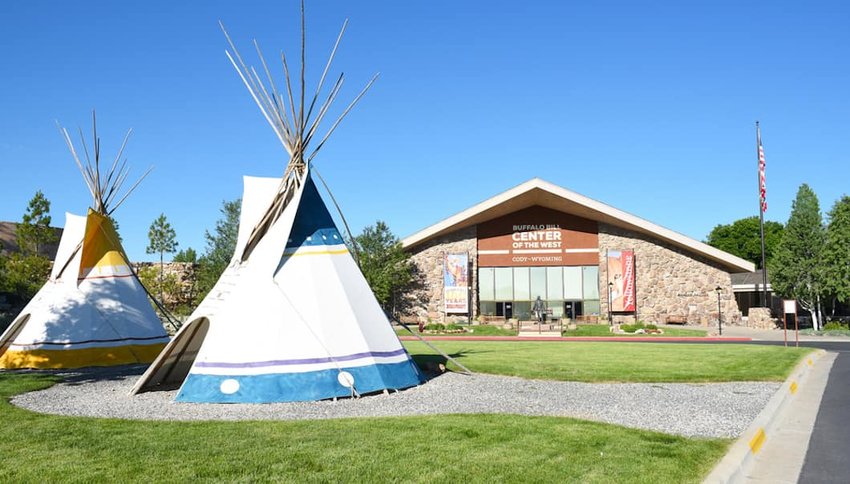
Wyoming - Buffalo Bill Center of the West  in Cody, Wyoming  (Hint:  Plan to spend lots of time even days.)


Credit: Steve Cukrov/Shutterstock
Boasting five museums for the price of one, Cody’s Buffalo Bill Center is sure to satisfy your thirst for the Old West. From learning about Western legends like Buffalo Bill and Annie Oakley in the Buffalo Bill Museum to the extraordinary pieces of art in the Whitney Western Art Museum, the museum's depth and attention to detail demonstrate the true essence of Yellowstone country.

Sunday, May 5, 2019

Secrets of the Internet

Secrets of  the Internet
This is an excellent video on how the Internet works. 


Sick Computer -- Simple Trick to Try

Image result for sick computer images
I'm often ask about fixing a computer or to diagnose a problem over the phone which is usually impossible.  I found this article that I would refer everyone to as a first attempt to fix a problem.  Many times it is all you need.

Why does rebooting your computer almost always fix it?
 Kim Komando

People and computers can be very similar; in some senses. After a long day of going to the gym, working, running errands and taking care of your family, energy runs low and completing certain tasks become more difficult.

At the end of the day, sometimes the best thing to do is to shut down and rest. Think about it, computers are the same way. When a computer is in use, applications are starting and shutting down all the time. After a while it can really overload your computer's memory.

That's why giving your computer a rest by rebooting it can help fix system problems you are experiencing. Let's talk about why this simple solution really works.Why restarting your computer works...most the time. Click here to read the rest of the article.
https://www.komando.com/tips/563442/why-does-rebooting-your-computer-almost-always-fix-it?utm_medium=nl&utm_source=totd&utm_content=2019-05-04

Under the Fair Use of Copyrighted Materials for Education, I have limited the amount that is used for educational materials.  You are referred to the owner's site to read the rest of it.

Sunday, April 21, 2019

Memory Keeping


Scrapbooking is very popular with travelers because it allows creativity while creating a memory book, either digital or paper.  However it is not practical to travel with reams of pretty papers.  I've decided to start a scrapbooking page where I will place links for ideas, digital papers and digital scrapbook ideas.  Check out its beginnings by clicking on the page in the bar above.  Find out where these lovely free papers came from.

Thursday, April 18, 2019

Nature Crafts


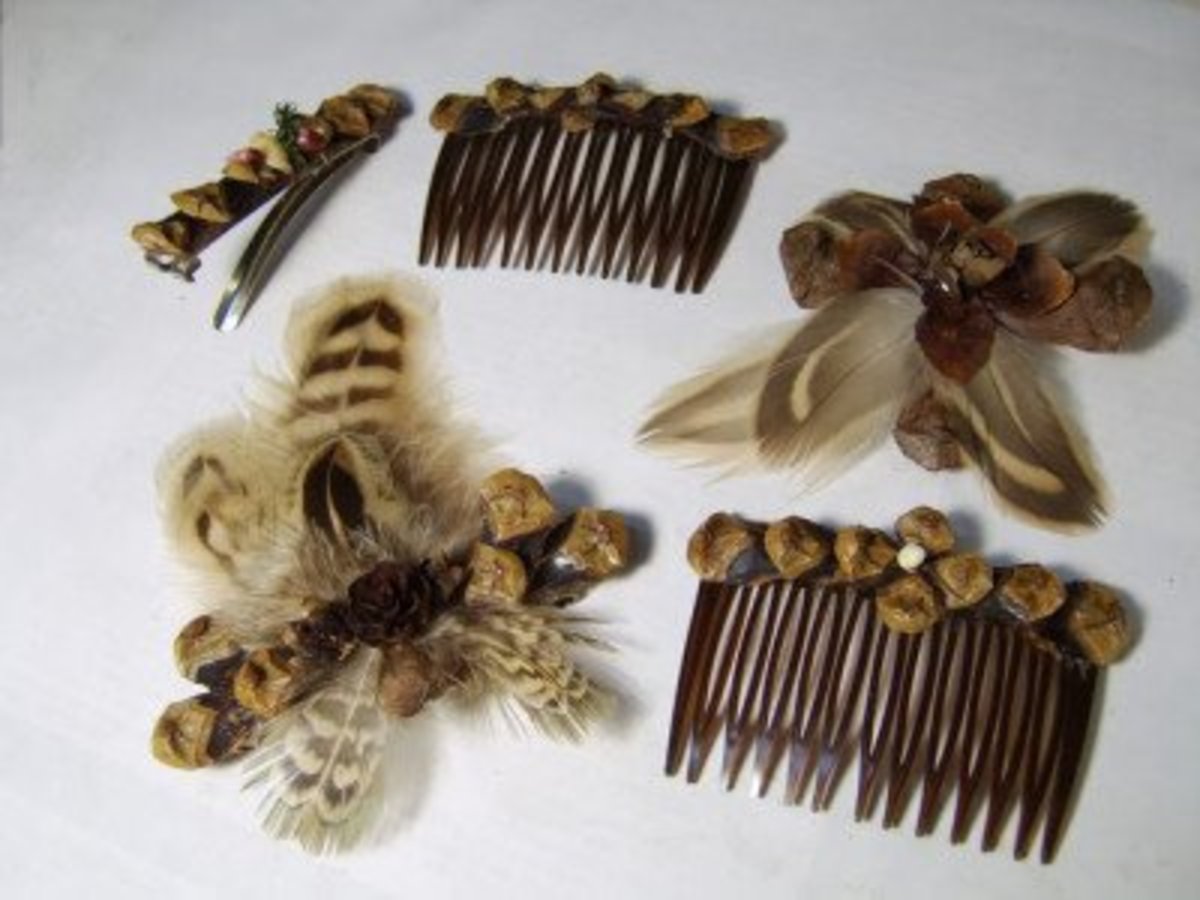
The places I love most are those deep in nature.  Trees, rocks, flowers and more make me happy.  I love the mountains of New Mexico.  I am starting a list of Nature crafts on the Arts and Crafts page. I love taking things of nature and making keepsakes or gifts.  Check out the list .
https://traveling-with-technology.blogspot.com/p/quilting-arts-and-crafts-on-road.html

Wednesday, June 13, 2018

Meteor Showers and More

Meteor Shower-Taurid, by Channone Arif-Wikimedia Commons


When is the next meteor shower? See the Almanac’s 2018 Meteor Showers Calendar for the dates of all the principal meteor showers during the year, plus meteor shower viewing tips.
https://www.almanac.com/content/meteor-shower-calendar

This webpage  https://www.almanac.com/ is a fount of knowlege for everyday living.  

Saturday, April 14, 2018

Spring is here and summer is right around the corner.  Time to be sitting out observing the stars and that great big ball we call the moon.  NASA has put together a video close-up tour of the moon so you can really see what you are  looking at.


Some Moon facts


On average, the Moon is roughly 384,402 km away from Earth, or about 238,856 miles. The second-densest moon in our solar system (behind Jupiter's Io), it is 1/81 the size of Earth, which, relative to the planet it orbits, is pretty large by moon standards.

Though humanity has been studying the Moon for years, it was not until July 21, 1969, when Neil Armstrong walked on its surface, becoming the first man in history to do so. His Apollo 11 mission was the first of seven that were to send astronauts to the Moon, though Apollo 13 never made it.

In total, 12 people have walked on the Moon, with the last coming in 1972. Since then, many other countries have had missions involving the Moon, and there are more scheduled for the coming years.

Sunday, December 17, 2017

Access to 250+ Digital Libraries Across the Nation

Are you researching a topic or your family history.  The information at this site will give you an amazing amount of options for your search.  Below is the article outlining the list.  Below the article is the list categorized by state.  Check this out to help in your search.  This is also on the Genealogy Page.

 Open Education Data Base

"Hundreds of libraries and archives exist online, from university-supported sites to accredited online schools to individual efforts. Each one has something to offer to researchers, students, and teachers. This list contains over 250 libraries and archives that focus mainly on localized, regional, and U.S. history, but it also includes larger collections, eText and eBook repositories, and a short list of directories to help you continue your research efforts.

The sites listed here are mainly open access, which means that the digital formats are viewable and usable by the general public. So, such sites as the Connecticut Digital Library (iCONN) are not listed, as they operate on the premise that the user has a Connecticut library card in his or her possession.Efforts were made to go to the root source for these collections. In other words, if you’re seeking the American Memory Project, which was created and housed at the Library of Congress, then you’ll find the link for the Library of Congress rather than the link for American Memory (although we included that link in the description of the Library of Congress listing). The root sources, in most cases, will lead you to collections that are too numerous to list here. In fact, it would be impossible to list all sources and we know we may have missed some favorites.

As a warning, many states listed their collections as “archives” when, in reality, the sources contained secondary sources such as books and transcriptions rather than a digital image of the actual document. Still, these resources can be invaluable for the person who seeks sources on family histories or on regional histories. To that end, we offer links to localized collections first, categorized by state. "

Saturday, October 7, 2017

New Additions to Genealogy Page -- Check them out on Genealogy button above.